

At Wuzzon, keeping up with app stores, ad platforms and analytics tools is how we keep our clients’ growth on track, and we like to share what we find. This autumn brought plenty of changes ahead of the holiday rush. Here’s what’s new from October and November, and how to use it.
App Store highlights
iPhone Duo: uploads are now open
In our August and September roundup, we covered the iPhone Duo screenshot sizes Apple published ahead of launch. In October, the missing piece arrived. Apple opened App Store submissions for iPhone Duo on 5 October, and the device went on sale on 23 October.
You can now upload Duo screenshots in App Store Connect, and once you do, your product page shows a badge telling people the app is made for iPhone Duo. There’s also a new preview tool showing how your page will look on the foldable. Apps built with older SDKs don’t use the full inner display, and those built with iOS 26 or earlier run in a phone-sized window.
What it means for ASO:
From April 2027, Duo screenshots become mandatory for app submissions. Apple’s news post applies this to all apps, while its specifications page limits it to apps built with the iOS 27.1 SDK or later, so we’d treat it as applying to everyone. With demand pushing delivery times into 2027 and very few apps optimised yet, adapting early is a cheap way to stand out and catch Apple’s editorial eye.
That editorial opportunity is already real. Apple’s Today tab now runs a “Great Apps and Games on iPhone Duo” collection, picking out apps that make proper use of both displays. Collections like this tend to appear around every new device launch and then fade, so the window for being picked is now, not next spring. If an app has a genuinely better unfolded layout, say so in the Duo screenshots and flag it to Apple through the featuring nomination form in App Store Connect.
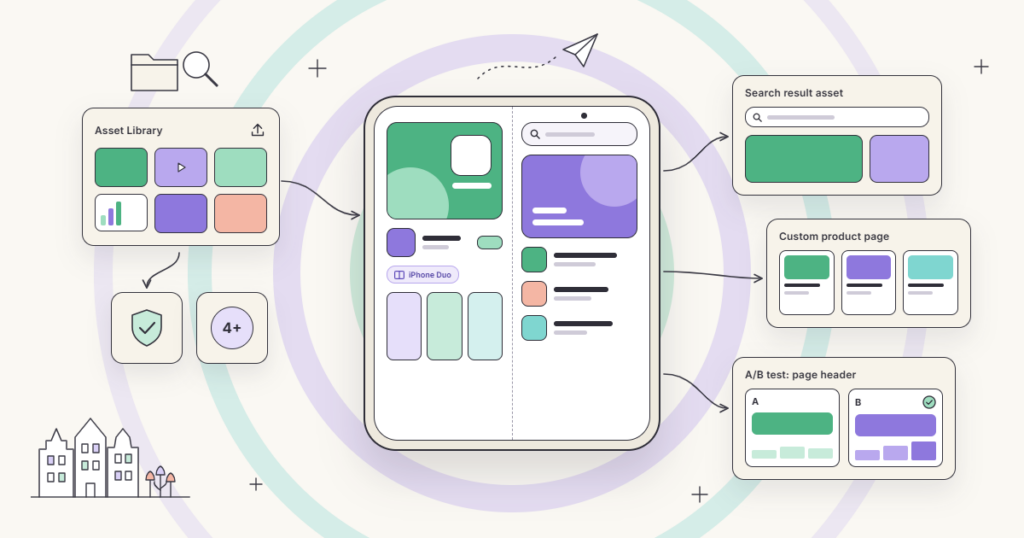
New App Store creatives: headers, search results and the Asset Library
Since 5 October, you can upload the new App Store creative formats we flagged in September. Product page headers and search result assets sit alongside your screenshots and, unlike screenshots, don’t have to show the app in use. The limits: no prices or discounts, everything must suit a 4+ audience, and a new App Review guideline (2.3.14) covers them specifically.
The new assets also plug straight into tools you already use. The Asset Library is one place to upload, manage and submit images and videos for review, ahead of any app update. Those assets can then be used on custom product pages, and product page optimisation can test alternative header visuals.
That closes a long-standing gap: get a header approved in the library, attach it to a custom product page for a keyword or Apple Ads ad group, and A/B test it against your default page, all without shipping a build.
What to do:
- Plan around your calendar. Use the Asset Library to get seasonal visuals approved weeks ahead, so a Black Friday or summer campaign goes live the day you need it, not the day review clears it.
- Protect your brand searches. If competitors bid on your name or look-alike apps crowd your results, a strong brand visual makes it obvious which app is the real one.
- Localise, don’t just translate. A header built around a local holiday or habit will usually beat one global visual with translated text.
Check every visual in the preview tool before submitting, since what works on a product page can look cramped in search results. Then treat the first round as a test: one direction per app, measure conversion, iterate.
Retention messages: a last word before subscribers cancel
Since 4 November, subscription apps can speak to users at the exact moment they try to cancel. When someone goes to cancel a subscription in their iPhone settings, Apple’s cancellation screen now shows a “From the Developer” message from the app, just above the Cancel and Keep buttons. Apps can use that space for a short note, an image or a special offer, such as a few months at a lower price, to change the user’s mind.
You set it up per auto-renewable subscription in App Store Connect, where you choose which subscribers see it and how often an offer can come back. Developers who want to pick a different message per subscriber, based on their plan or history, can request access to the Retention Messaging API.
Why it matters: until now, the cancellation screen was the one moment in the subscriber journey you couldn’t touch. A few practical ideas:
- Remind people what they’d lose. A coming feature or the value they’ve already built up (saved plans, progress, history) often works better than a discount.
- Save offers for the right people. A blanket discount trains users to cancel for a deal. Use eligibility rules and the wait time so offers go to subscribers worth winning back.
- Measure it like any test. Track saves against cancellations and check whether saved users stay past the next renewal, not just the next month.
Google Play & Google Ads highlights
Play Console expands retention metrics to Day 2, 3, 14 and 28
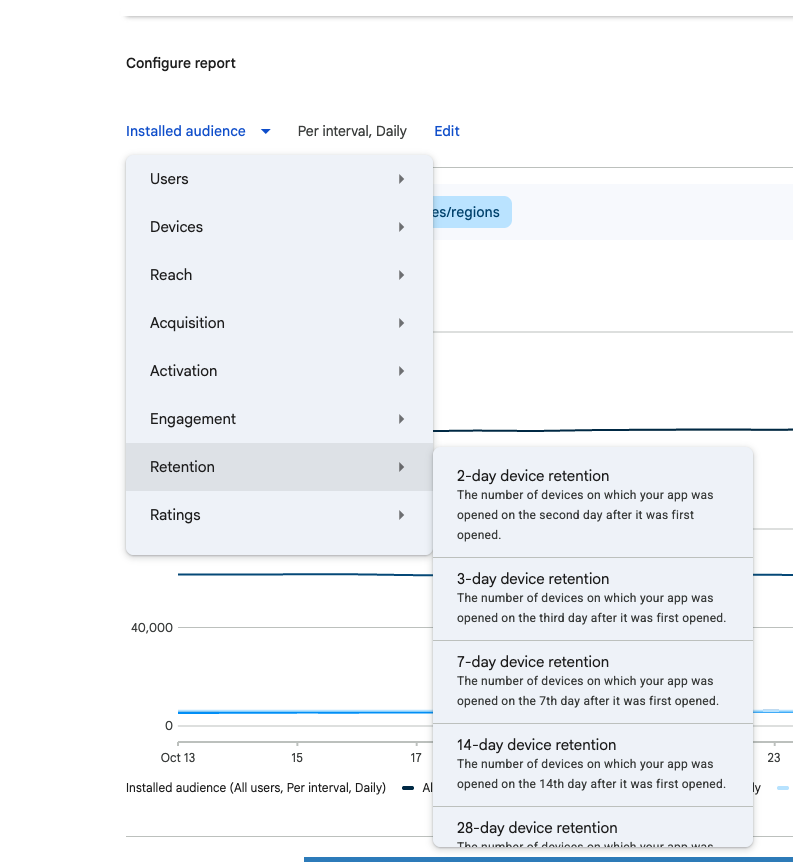
Late September brought a useful Play Console update: Day 2, 3, 14 and 28 retention now sit next to the Day 7 figure, so you can see the whole retention curve in one place. You can slice each one by any Console dimension, Traffic source included, from the Retention group on the Statistics page.
What it means for you: Day 2 and 3 show whether onboarding lands, and Day 14 and 28 whether the app becomes a habit. Split by Traffic source, they show whether Search and Explore users retain as well as paid ones. If keyword-driven installs churn by Day 3, the listing is probably promising something the app doesn’t deliver.
What to do: pull a baseline for each of your main traffic sources now, so you have a before picture for your next listing change or custom store listing test.
Promotional content can now go live up to 14 days early
Google Play has extended how far ahead promotional content can appear. When you set up an event in Play Console, you can now choose to show it on Play anywhere from 1 to 14 days before it starts, and users can opt in to a notification when it goes live. That brings Play much closer to Apple’s In-App Events, which already allow two weeks of pre-event visibility.
What it means for you: this turns promotional content from a launch-day spike into a two-week campaign. A longer lead time means more impressions in Play’s discovery surfaces, more time to build a notify-me list that converts on day one, and a cleaner run-up for seasonal moments like Black Friday or the new year. It also makes cross-platform planning easier: you can now run the same event on both stores with matching timelines and creative. What to do: default to the full 14 days for anything with real anticipation behind it, such as a big feature launch, a seasonal offer or a content drop, and keep shorter windows for routine events where a long teaser would feel stretched.
Google Ads tests ad group-level seasonal adjustments for App campaigns
Google Ads is testing a new scope for seasonal adjustments in App campaigns. Until now, you could only tell Smart Bidding to expect a conversion spike across a campaign type or a whole campaign. The beta adds a third option: specific ad groups.
Why it matters: most app promotions don’t apply to every ad group. A Black Friday discount might only target a subscription-focused ad group, or a launch might only run in one market. Applying the adjustment at campaign level pushed bids up everywhere, including where nothing had changed. With ad group scope, you can raise bids only where you expect the lift, and keep the rest of the campaign steady.
What to do: use it for short, clearly bounded promotions, and only with a realistic estimate of the conversion rate change. An optimistic adjustment overspends just as fast at ad group level.
Other channels
ChatGPT tests visual ads during image generation
OpenAI is starting to test display ads that appear alongside the images people generate in ChatGPT. The test runs in the US only, on ChatGPT’s free and low-cost tiers, and was due to start in late October with a small group of advertisers. Ads are clearly labelled, kept separate from the generated image, and OpenAI says they don’t influence ChatGPT’s answers.
The detail that matters for app marketers is the measurement partner list: AppsFlyer, Adjust, Branch, Singular, Kochava, Airbridge and Tenjin are all named, which suggests app advertisers will be able to measure ChatGPT as a channel once it opens up. It’s too early to put the budget behind it, but with more than a billion weekly users, it’s one to watch for 2027 UA planning.
Staying ahead of these changes
That’s a lot landing on both stores at once, and right in the middle of Q4. Most of it rewards the teams who move early: Duo-ready screenshots before April, creative assets approved ahead of seasonal peaks, and retention and promo tools set up before the January churn wave.
If you’d like a second pair of eyes on what these updates mean for your app, get in touch. We’re happy to help you turn them into a practical growth plan.
 EN
 NL
